The short version
- What it shows
- Which end of the start line is favored, by how many degrees, and what that's worth in distance, in your own feet or meters. On the iPhone and the Apple Watch, beside the countdown.
- What it needs
- Two taps, one at each end of the line, and a wind. Point the bow into the wind and tap once.
- What it's worth
- Line length × sin(bias). The app does the arithmetic so you can decide whether an end is worth fighting for.
- Free or Pro
- Line bias, the favored end, distance and time to the line and time to burn are part of Pro. The countdown itself is free.
What line bias is
A race committee tries to set the start line square to the wind, so every boat on it is the same distance from the windward mark. They rarely get it exactly right, and the wind moves anyway. So one end usually sits a little further upwind. That's the favored end, and the angle the line is skewed by is the bias. Start there and you begin the race closer to the mark than a boat at the other end.
You can find it by eye, head to wind, or with a compass and some arithmetic. How to find the favored end walks through all three methods. This page is about the third: ping both ends with GPS and let the app work it out, and keep working it out as the wind moves.
Setting up the line
On the iPhone, open Setup → Marks from the Sail tab. Sail past the pin and tap Pin, then past the committee boat and tap Boat. A captured end is a toggle: tap it again to drop it, so a mis-tap costs one tap rather than a sail back to the mark. Clear line removes both.
On the Apple Watch, open Race Setup from the timer screen and tap the Pin and Boat tiles the same way. Each reads Captured once set. The line stays set until you clear it, so you can capture it on your practice sail.
Then set the wind. Point to Wind is the one to use: turn the bow into the wind and tap once. On the iPhone you can also take the Weather forecast or type a number. The setup guide covers the whole race-day setup.
Reading the favored end
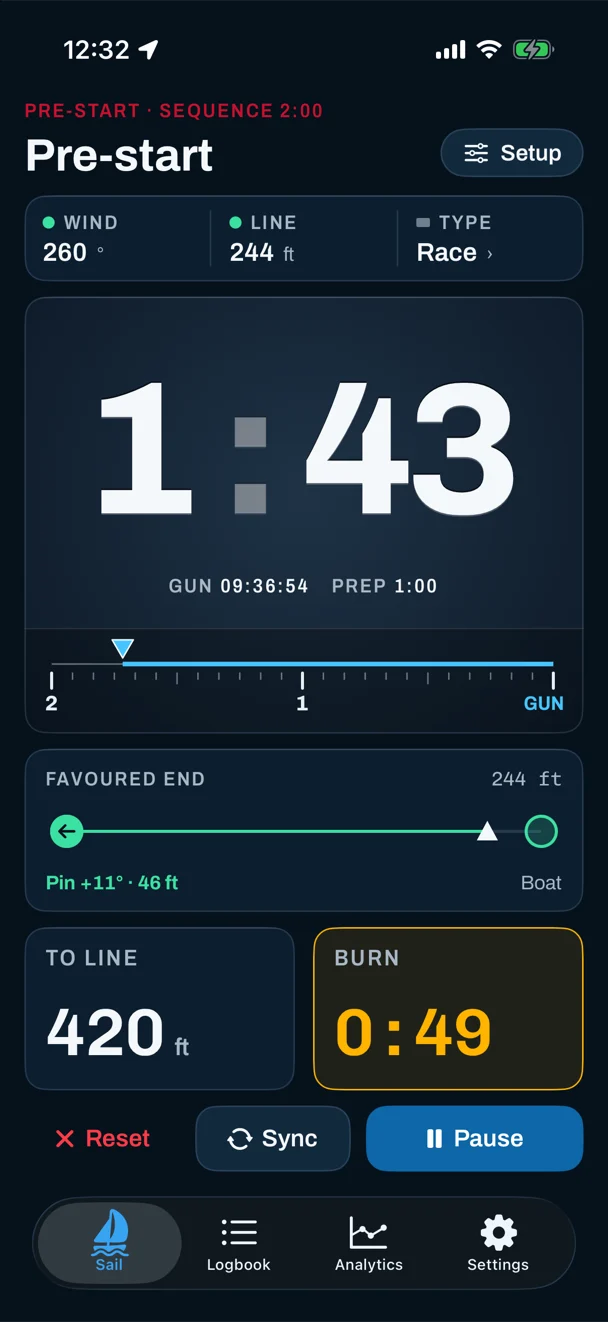
On the iPhone pre-start screen, the favored-end panel shows a bar from pin to boat with an arrow at the favored end, the line's length, the bias in degrees, and what it's worth in distance. Before the line is set the panel reads --; tap it to go to Marks. The bias reads from 0° to 90°, and a typical committee line is within a few degrees of square.
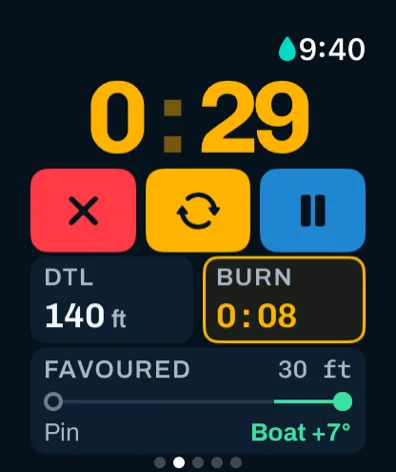
On the watch, the same bar sits under the countdown with the favored end and its bias, next to your distance to the line and time to burn.
Degrees and distance
Sailors talk about bias in degrees, but distance is what tells you whether it matters. The two are linked by one line of trigonometry: gain = line length × sin(bias). The app shows both, in your chosen distance unit, so you don't have to do it in your head with two minutes to go.
Two examples straight from the screens above. A 244 ft line with 11° of bias is worth about 46 ft. A 287 ft line with 22° is worth about 108 ft. Long lines magnify bias, and a couple of degrees on a short line is worth very little. Weigh the gain against a crowded end and bad air before you commit; when it's worth fighting for has the questions to ask.
Only as good as the wind
Every degree of error in the wind is a degree of error in the bias. So the iPhone labels where its wind came from, under the favored-end bar:
- FORECAST — from WeatherKit, for a wide grid square. Often 20–30° out at a lake or in a shoreline breeze.
- SET — the wind you pointed to or typed in.
- TRACKED — the app's own estimate, refined from the courses you've sailed upwind.
- WATCH — the watch is controlling a mounted phone, and both show its number.
With wind-shift tracking (also Pro), the favored end follows the breeze. After a few minutes of beating on both tacks, the tracked estimate takes over the live numbers. It never wanders more than 30° from the wind you set, or somewhat further from a forecast, and it doesn't learn from reaching, running or drifting. It reacts over minutes, so a shift in the last few minutes may not show yet. If the wind has moved, take it again head to wind. The same wind drives your VMG and target heading after the gun.
Getting there at the gun
Knowing the favored end is half of it. Once the countdown runs, To Line gives your distance to the line, measured square to it, and Burn gives the seconds you have in hand (green) or how late you are (red) at your current approach. Past an end, the app says Beyond pin or Beyond boat and holds Burn at --. The start timer page covers the countdown.
These numbers come from GPS that updates about once a second. That's good enough to know whether you're early or late and by roughly how much, and to see which end is favored. It won't place your bow on the line to the inch; phone and watch vs dedicated instruments explains the difference.
After the race
Because recording starts with the countdown, your start is in the track. On the iPhone, a session's Start tab shows which end you started at and which end was favored, next to your distance back from (or over) the line at the gun and your speed. That part needs the start line and a wind you set yourself. An estimated wind isn't used there, because which side counts as over depends on it.
Forgot to ping the line? Place both ends on the session map afterwards from the Start Line tool. Those are estimates by eye, and the Start tab updates as you move them. The Coach card's Start chip then says whether the start was on time and at speed. Read more about the debrief in what Sail Tactician does differently.
Questions
Is there an app that shows the favored end of the start line?
Yes. Sail Tactician shows the favored end, the bias in degrees and what it's worth in distance on Apple Watch and iPhone, once you've tapped both ends of the line and set a wind. It's part of Pro.
How does a start line bias app work?
You tap the pin and the committee boat as you sail past each, and set the wind direction. From the two positions and the wind, the app works out which end is further upwind, by how many degrees, and line length × sin(bias) for the distance.
Why does the favored end change during the sequence?
The line stays put while the wind shifts, and every degree of shift changes the bias by a degree. With wind-shift tracking on, the app's estimate follows the breeze from your upwind sailing, but a late shift may not show yet, so take the wind again head to wind.
How accurate is GPS line bias?
The bias is only as good as the wind you give it, so set the wind on the water rather than trusting a forecast. Distance to the line updates about once a second, good enough to know whether you're early or late and by roughly how much.
Can I add the start line after the race?
Yes. On the iPhone, place the pin and committee boat on the session map. They're estimates by eye, and the Start tab updates from them.
Sources
The gain formula is basic trigonometry. Sail Tactician behavior is from the in-app User Guide, version 3.2, also available as the full user guide.
What changed
- First published.
Put a racing instrument on your wrist.
Start line, wind shifts and VMG at a glance, and a coach in your pocket afterwards. Free to download for Apple Watch and iPhone, with the full debrief on your first five races.
Download on the App Store