The short version
- What it is
- A regatta countdown for Apple Watch and iPhone with a one-tap sync to the nearest minute, spoken or beeped cues, and a long beep at the gun.
- Is it free?
- Yes. The countdown, the sync, the audio cues and Black Box mode are free, and the start is recorded with every race.
- What Pro adds
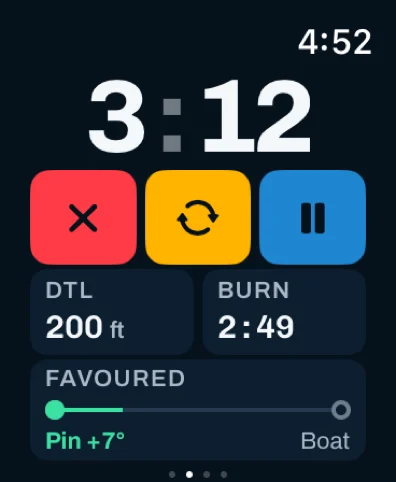
- The start line: distance to line, time to line, time to burn and the favored end, beside the clock.
- How accurate
- The clock is exact. The line numbers come from GPS that updates about once a second: enough to know whether you're early or late and by roughly how much.
What a start timer has to do
Most fleets start on a five-minute sequence: warning at five minutes, preparatory at four, one minute, then the start. You need a clock that agrees with the committee to the second, reads at a glance, and tells you how long is left without you looking at all. Sail Tactician's timer does that on the Apple Watch and the iPhone. Set it in whole minutes, or to 0 to start the race straight away.
Syncing to the committee
Start the timer on any signal, then sync on the next one. Sync rounds to the nearest minute: 4:40 becomes 5:00 and 4:20 becomes 4:00, so one press on the next flag fixes a start that was a little early or late.
- On the watch it's the orange ↻ key under the clock.
- On the iPhone it's the same orange key, in the same place in the row.
- On a watch with an Action button, set it up once and a press starts the countdown, then the next press syncs it.
A sync gives one tap and, in voice mode, says the minute it landed on ("three minutes"), so you know it took without looking down. If your watch is driving a mounted iPhone, both land on the same time.
Cues you can hear
Pick an Audio Style: spoken numbers, beeps, or silent. In voice mode every whole minute from ten down is spoken; in beeps mode a minute mark is a long beep. Cue Final Seconds sets when the per-second count begins: 5, 10, 15, 20, 25 or 30 seconds out. A long beep sounds at the gun. Volume, haptic taps and a Test Sound button are in Setup's Timer screen, so you can check it all at the dock.
On the watch
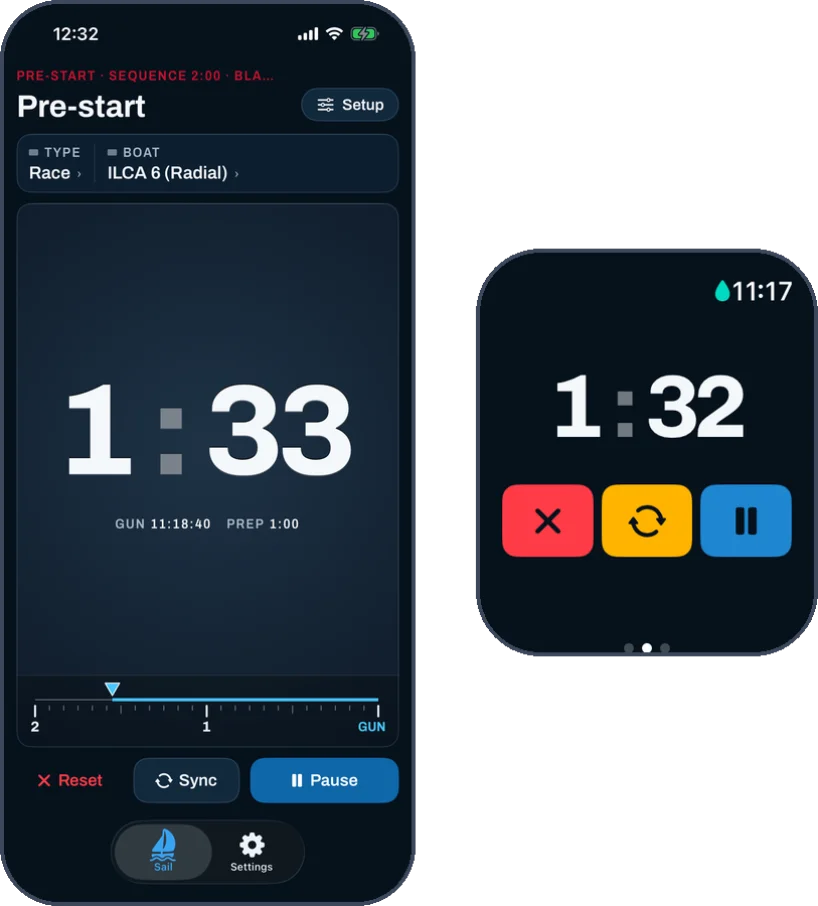
The watch opens on the timer. Set the minutes with −/+, tap Start, and the countdown fills the screen above three large keys: red to cancel (after a confirmation), orange to sync, blue to pause. Set Water Lock to When Countdown Ends and the screen stays live through the sequence so you can sync, then locks at the gun. More on the Apple Watch sailing app page.
On the iPhone
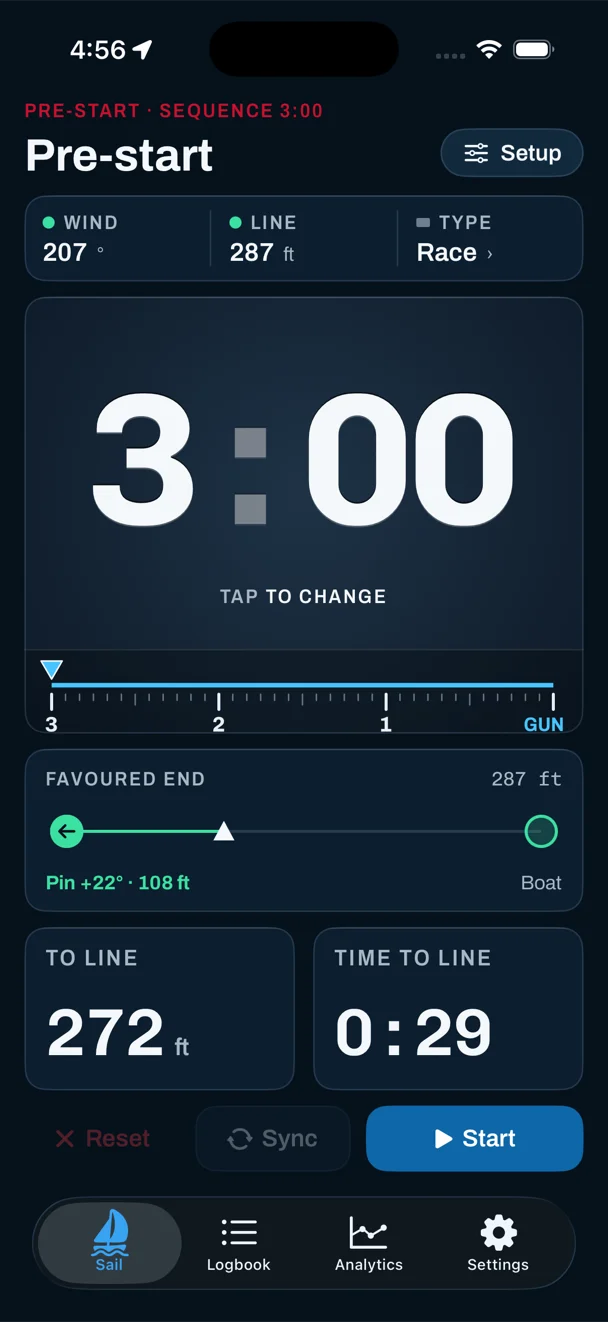
The Sail tab's pre-start hub shows the countdown length as a big number. Tap it to change the minutes. It isn't a button: Start is a separate key at the bottom, so a block that size can't be brushed into a start. Once the countdown runs, the clock stays in the same place at the same size and turns red for the last 30 seconds. A strip under it marks the minutes down to GUN.
The three keys match the watch, in the same order and colors: Reset, Sync, and Start / Pause. At the gun the screen switches to your race views, with VMG and tack calls if you have Pro.
From a timer to a start
A clock tells you when the gun goes. It can't tell you where you'll be when it does. That's what the start line adds, and it's part of Pro. Sail past the pin and the committee boat, tap each one, and the timer screen adds:
- To Line — your distance to the line, measured square to it, in your own units.
- Time to Line before you start the clock, so you can practice timed run-ins.
- Burn once the countdown runs — seconds in hand (green) or late (red) to hit the line at the gun at your current approach.
- Favored end — which end is further upwind, by how many degrees and what that's worth in distance. See start line bias.
Burn reads -- while you're sailing away from the line or past an end, rather than showing a stale number. Past an end, the app says Beyond pin or Beyond boat. These numbers update about once a second from GPS. That's good enough to know whether you're early or late and by roughly how much. It won't place your bow to the inch, and phone and watch vs dedicated instruments explains where that matters.
Just the clock: Black Box
Some sailors want a timer and nothing else. Black Box, free, gives you exactly that: the countdown runs as normal, and at the gun the screen becomes elapsed time, a recording dot and End. No distance to line, no favored end, no race pages, on either device. Ending goes straight back to a re-armed timer for the next race. Everything is still recorded for the debrief. What your class allows on screen is for its rules to say.
After the gun
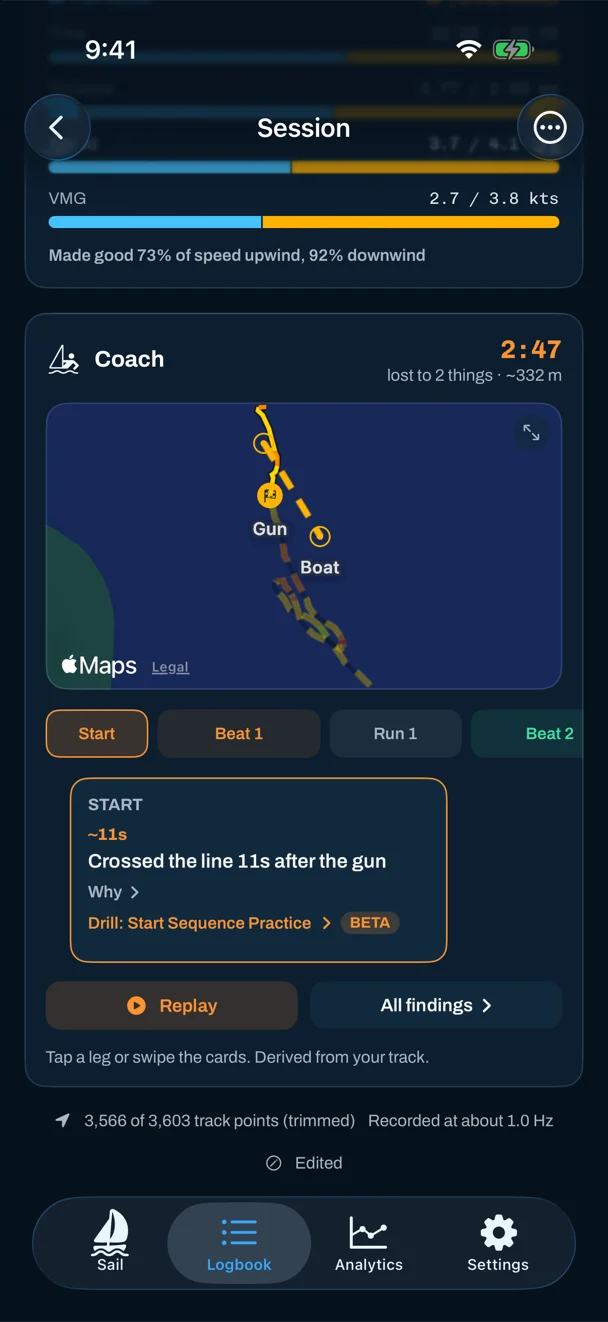
Because recording starts with the countdown, the start is in your track. On the iPhone, a session's Start tab shows the last two minutes and the first thirty seconds: your speed at the gun, your best approach speed, time to get up to speed, and gun speed as a percentage of your race pace. With a start line and a wind you set yourself, it adds how far back from (or over) the line you were at the gun, and which end was favored.
The Coach card's Start chip gives the verdict in one line, with how many seconds it cost. With Pro, Start Sequence Practice runs countdown reps on a line you've pinged and scores each one at the gun for being over, late or slow.
App or dedicated timer?
A dedicated race timer has huge digits, months of battery and nothing to set up. If counting to the gun is all you need, it's hard to beat. An app on a watch you already wear adds what a timer can't know: where the line is, which end is favored, and how the start went. The best sailing watches and the best sailing apps compare the options.
Questions
Is there a free sailing start timer app?
Yes. Sail Tactician's countdown, sync, spoken or beeped cues and Black Box mode are free on Apple Watch and iPhone. Distance to the line, time to burn and the favored end are part of Pro.
How does sync work on a regatta timer app?
Press sync on a signal and the countdown rounds to the nearest whole minute, so 4:40 becomes 5:00 and 4:20 becomes 4:00. One press on the next signal corrects a start that was a little early or late.
Can the timer count down out loud?
Yes. In voice mode it speaks every whole minute from ten down and counts the final seconds, starting anywhere from 5 to 30 seconds out, with a long beep at the gun. Beeps or silence are the other options.
Does the watch and phone timer stay in sync?
When the watch is controlling a mounted iPhone, starting, syncing, pausing and resetting on the watch drive the phone, and both count to the same gun.
Can I use only the timer and hide everything else?
Yes. Black Box mode shows only the countdown and then the elapsed time, on both devices, while still recording the race. It's free.
Sources
Everything here describes Sail Tactician 3.2 and is taken from the in-app User Guide (Settings → Support → User Guide), also available as the full user guide.
What changed
- First published.
Put a racing instrument on your wrist.
Start line, wind shifts and VMG at a glance, and a coach in your pocket afterwards. Free to download for Apple Watch and iPhone, with the full debrief on your first five races.
Download on the App Store