
The short version
- What it is
- Ask AI hands a race you recorded to the AI app you already use, such as Claude or ChatGPT, with your question and everything the app measured, so you can talk the race through like you would with a coach.
- Is it free?
- Yes, on every plan. It's in beta.
- What goes
- Your question, the race's figures, the Coach card's findings, every tack and gybe, each leg and the wind as the app tracked it. A course map and your GPS track go too, unless you switch them off.
- Privacy
- Nothing leaves your iPhone until you pick an app, and you can read exactly what will be sent first. No account with us, no upload to our servers.
Why hand a race to an AI
The Coach card already ranks what cost you time, in seconds. What it can't do is answer the question you have next: why was the second beat slower, what should I practise this week, was it the start or the first shift? A general-purpose assistant is good at that conversation, but only if it has the facts. Paste a GPX into a chat and it gets hundreds of thousands of numbers with no idea what a tack or a layline is. Ask AI gives it the race the way the app understands it, in a form it can read.
How it works
Open any race in your Logbook on iPhone and tap Ask AI about this race, under the Coach card, or ⋯ → Ask AI.
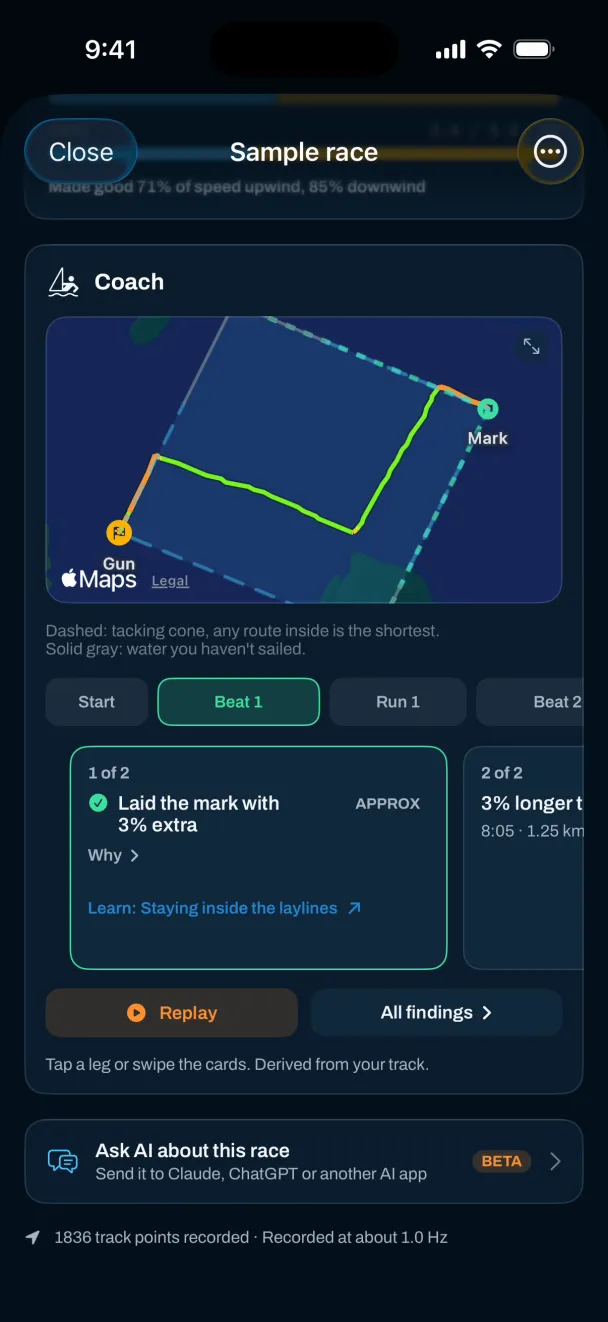
- Pick a question, or ask about one leg the coach flagged.
- Say what you're working on, if you like ("starts", "tacking in a breeze"), and the answer is aimed at it.
- Choose what goes: the course map, your GPS track and your race notes are on unless you switch them off. About you (new to racing, club racer, experienced) sets how the assistant pitches its words, and is remembered.
- Share to an AI app and pick your assistant in the share sheet, or Copy text to paste into any assistant.
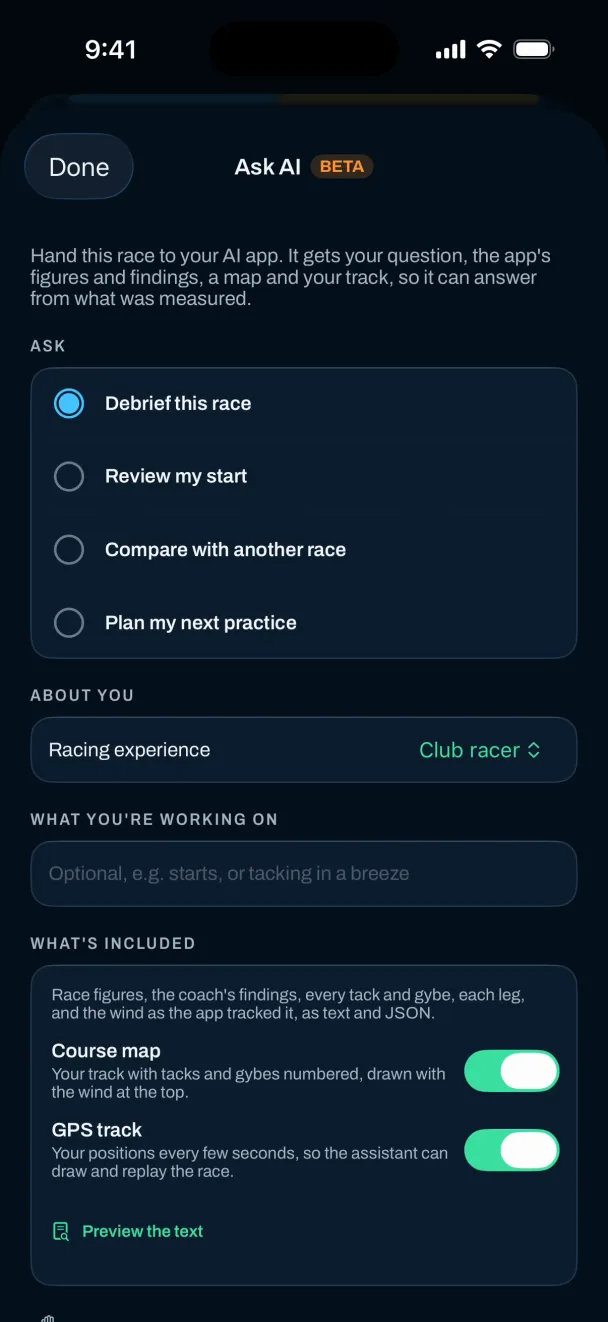
The questions you can ask
- Debrief this race — what went well, the one or two things that cost the most time, and one thing to practise.
- Why was Beat 2 slow? — one question for each leg the coach has a finding on.
- Review my start — your speed and position at the gun, and how long it took to get going.
- Compare with another race — one of your own, or one another sailor shared with you. If you sailed it together, the assistant also gets the app's comparison: who led, where it changed and why.
- Plan my next practice — drills aimed at what this race says you need.
Once it has answered, keep the conversation going in the assistant like any other chat. It has the whole race to work from.
What the assistant gets
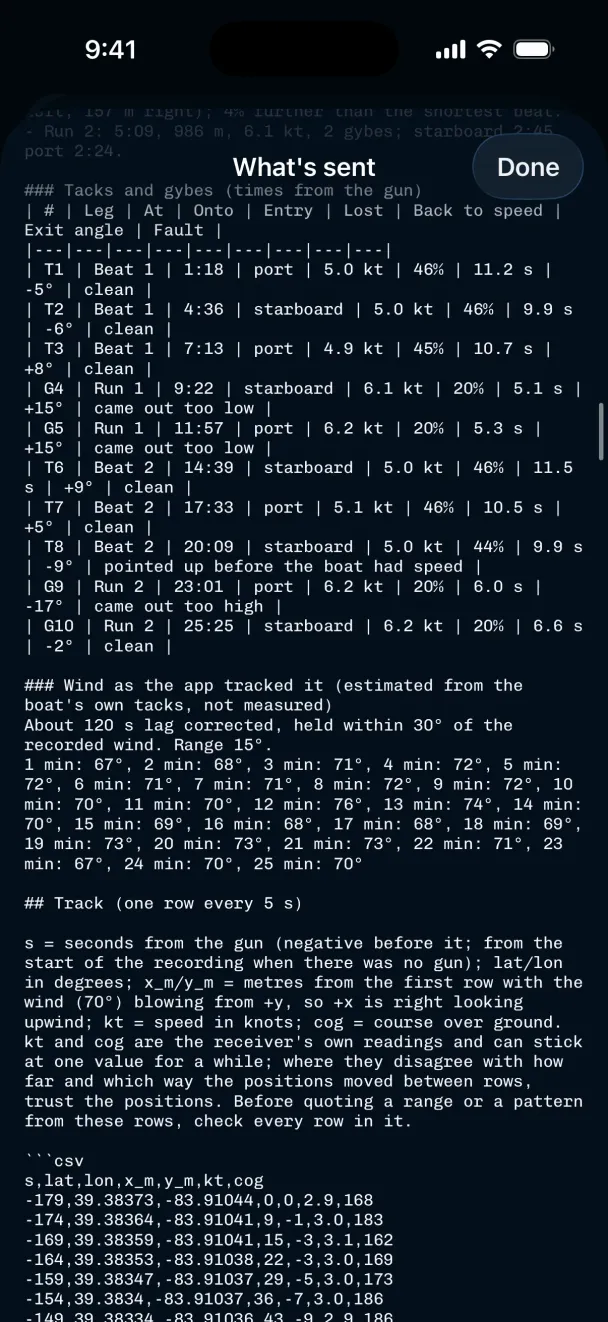
Always: the race's figures and the coach's findings, every tack and gybe with its speed loss and time back to speed, each leg (time on each tack and which side of the course you sailed) and the wind as the app tracked it, in your own units. Tacks and gybes carry the same numbers as the app's map and Coach card, so "tack 8" means the same thing in both places.
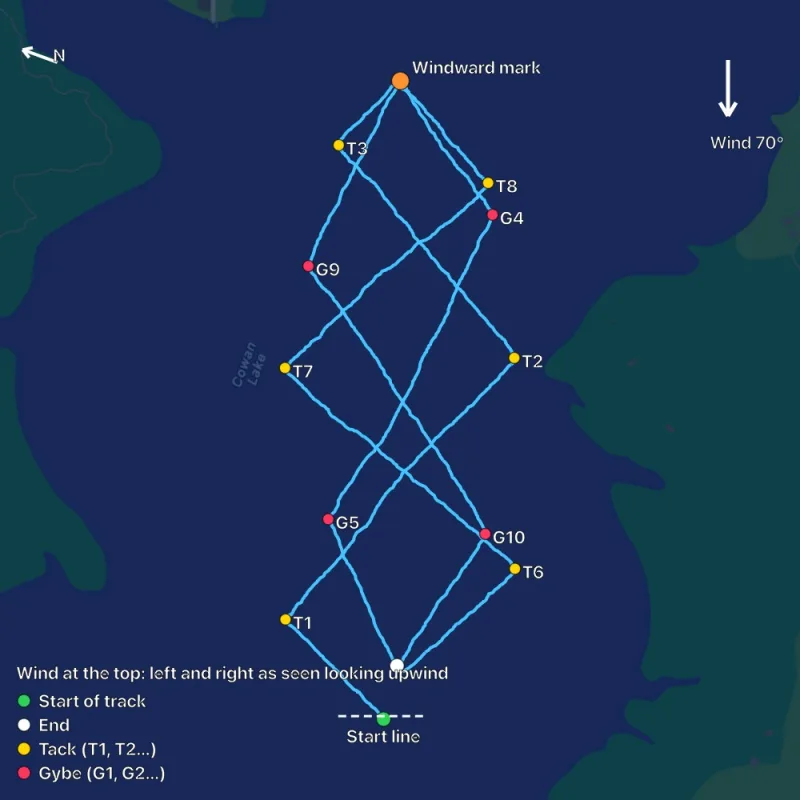
- Course map — your track with tacks and gybes numbered, drawn with the wind at the top, so its left and right are the course's.
- GPS track — your position every few seconds, with speed and course, as a table the assistant can read and draw from. It replaces a GPX file, which is far too big for a chat to read.
- My notes — what you wrote under Results & Notes. Another sailor's notes never go.
Preview the text shows exactly what will be sent, word for word.
How it's told to answer
A chat assistant will happily invent a number or call a slow tack fast. The instructions that go with every race are there to stop that, and were tuned against graded answers to real races:
- Quote the app's figures, don't work out new ones, and say so when a number isn't there.
- No verdict without a comparison. Nothing is "fast" or "slow" unless the data compares it with something: the class's angles, another leg, the race average.
- Say how sure it is. It's told which figures use one wind direction for the whole race and so don't follow shifts, and to say so when the wind was a forecast or only the bearing to the mark.
- No "best route". Inside the laylines every two-board beat is the same length, so it's told to look at where time was lost instead: overstanding, slow tacks, tacking on lifts.
- Short, then specific. Three opening lines (the biggest lesson, what went well, one thing to practise), about two phone screens in all, a picture of its main point where it can draw one, and a few questions only you can answer.
Follow-up questions
The first answer is a starting point. Because the assistant has your track and every tack, you can ask it things the app doesn't show on one screen: "show me tack 8 on the course", "which side of the beat was faster?", "did my tacks get slower as the race went on?". Assistants that can draw, such as Claude, can turn the track into a chart or a replay right in the chat.
Privacy
Ask AI needs no account with us and sends nothing to our servers. The race goes only to the app you pick in the share sheet, and that company's privacy terms apply to it. The date of the race goes, but not the time of day. Switch off GPS track if you'd rather no positions went. Read more in the privacy policy.
Questions
Can ChatGPT or Claude analyze my sailing race?
Yes. Record the race with Sail Tactician, then tap Ask AI. The app sends the assistant your question with the race's measured figures, the coach's findings, every tack and gybe, a course map and your GPS track, so it can answer from what happened rather than guess.
Is Ask AI free?
Yes. Ask AI is free on every Sail Tactician plan, and in beta. You use your own AI app, on whatever plan you have with it.
Which AI apps does it work with?
Any app that appears in the iPhone share sheet, such as Claude or ChatGPT. Copy text works with any assistant you can paste into.
Does Sail Tactician see my AI conversation?
No. The race goes straight from your iPhone to the app you choose. Sail Tactician only counts that a race was handed off, which question was asked and what kind of app it went to, never the race or the answer.
Can I ask about a race I imported from Garmin or another device?
Yes. Ask AI works on any race you can open in your Logbook, including races imported from a Garmin, COROS or Suunto, and on the sample race.
Do I need an Apple Watch?
No. Ask AI is on the iPhone, for races recorded on the iPhone, the Apple Watch or imported.
Sources
Everything here describes Sail Tactician 3.5 and is taken from the in-app User Guide (Settings → Support → User Guide), also available as the full user guide. The screens are from the app's sample race.
What changed
- First published.
Put a racing instrument on your wrist.
Start line, wind shifts and VMG at a glance, and a coach in your pocket afterwards. Free to download for Apple Watch and iPhone, with the full debrief on your first five races.
Download on the App Store