
The short version
- What you need
- An iPhone with Sail Tactician, and the race your watch already recorded, exported as a FIT, GPX or TCX file.
- What it costs
- Nothing to import. Importing works on the free tier. Pro unlocks the live tactical tools and your whole history.
- What you get
- Your track replayed on a map, every tack and gybe found and measured, port vs starboard, upwind vs downwind, a polar of the angles you actually sailed, and — once you give it a wind and a windward mark — the Coach's ranked debrief.
- Best file to use
- FIT, recorded at one point per second if your watch lets you choose.
Why bother
If you race with a Garmin, a COROS, a Suunto or a Polar, your watch has been quietly recording every race you've sailed: a GPS point every second or so, your speed, often your heart rate. And then the app it syncs to shows you a squiggle on a map, a pace graph, and the calories you burned — because to Garmin Connect or Strava a race is just another run.
That track holds far more than that. Every tack and gybe is in it, and how much speed each one cost. So is the angle you sailed on each tack, how long you spent on port versus starboard, how far you sailed past the layline, and whether you got off the line at pace. Sail Tactician reads the file your watch already makes and works all of that out. You don't need to change watches, buy anything, or race with a phone.
What works with what
| Recorded on | Export as | Where you export it | Extras that come across |
|---|---|---|---|
| Garmin (quatix, fenix, Forerunner…) | FIT (in a .zip) | Garmin Connect website, or the watch over USB | Heart rate |
| COROS | FIT | COROS app | Heart rate |
| Suunto | FIT | Suunto app | Heart rate |
| Polar | FIT | Polar Flow website | Heart rate |
| Wahoo | FIT | Wahoo app | Heart rate |
| Google Pixel Watch / Fitbit | TCX | Google Health / Fitbit app | Heart rate |
| Apple Watch Workout app | FIT or GPX | A helper app such as HealthFit | Heart rate |
| Strava (any device) | Original file or GPX | strava.com | Depends on the device |
| Vakaros Atlas | VKX | Vakaros Connect app | The gun, both start-line ends, the wind |
| Velocitek SpeedPuck / ProStart | GPX | Velocitek's online converter | — |
| Sailmon | GPX | Sailmon | — |
| Instrument logs (NMEA 0183) | NMEA text log | Your logger or plotter | Wind from MWD sentences |
Sail Tactician also reads CSV, and a .zip holding any of these. Speed and course are worked out from the track whenever a file doesn't carry them, which most watch exports don't.
Getting the file off your watch
One pattern catches people out: most brands only export from their website, not their phone app. On an iPhone, Safari works fine for the website ones — the file lands in Files, and you open it from there.
Garmin
- In Safari, sign in at connect.garmin.com and open the activity. (The Garmin Connect phone app can't export files.)
- Open the gear or ⋯ menu and choose Export Original.
- You'll get a .zip. Leave it zipped — Sail Tactician opens the zip itself.
No account? Plug the watch into a computer; the files are in its GARMIN/Activity folder, named by date. On a Mac, most recent Garmins need a free tool such as OpenMTP to see them.
Set your Garmin to "Every Second". Garmin's default Smart recording only writes a point when your course or speed changes, which can leave several seconds between points on a steady leg. Sail Tactician fills those gaps so tacks and average speed still come out right — and says so under the map — but Data Recording → Every Second times each tack most precisely. It's in the watch's system settings; the exact menu varies by model.
COROS
- In the COROS app, open the activity.
- Tap ⋯ → Export Data → FIT.
- Choose Sail Tactician from the share sheet, or save to Files.
Suunto
- In the Suunto app, open the workout and tap ⋯.
- Choose FIT. Avoid GPX (route) — it has no timestamps, so there's nothing to analyse.
Polar
- Sign in at flow.polar.com, open Diary and click the session.
- Use the Export menu and choose FIT.
Apple Watch (Apple's Workout app)
If you record races with Apple's own Workout app rather than a sailing app, the Health app has no way to export a single workout. A helper app does it: HealthFit ($6.99, no account) or RunGap export a workout as FIT or GPX. Check first that the workout has a route on its map in the Fitness app — without GPS there's nothing to import. Or skip the step entirely and record with Sail Tactician on the watch, which also gives you the countdown and start line.
Strava
Strava only exports from its website: open your activity on strava.com, open ⋯ and choose Export Original (usually the FIT file your device uploaded) or Export GPX. Original is better. You can only export your own activities.
Vakaros, Velocitek and Sailmon
- Vakaros Atlas — download the session in Vakaros Connect and export it as VKX, not CSV. VKX keeps the gun, both ends of the start line and the wind, so the start analysis works straight away.
- Velocitek — SpeedPuck and ProStart logs are .vtk files, which Sail Tactician can't read directly. Convert them to GPX with Velocitek's free online converter first.
- Sailmon — download the trip as GPX.
Importing it
On your iPhone, either:
- tap the file in Files (or when it arrives by AirDrop) and choose Copy to Sail Tactician, or
- in Sail Tactician's Logbook, open ⋯ → Import Sessions… and pick one or more files.
Bring the same activity in twice and you get one race, not two — the app recognises it. A file that doesn't name its race is titled after the file. You can import a whole season in one go: select many files, or a .zip of them.
Finishing the race: boat, wind and mark
A fitness watch records where you went, not why. So an imported race opens with a Complete this session card listing what the file couldn't say:
- Type — race, training or cruise.
- Boat — from more than fifty class presets, which set the tacking and gybing angles the analysis is measured against.
- Wind — set it on a wind rose over the map, or accept the app's estimate.
- Windward mark — drop it on the map where the beat turned.
The mark is the important one. Placing it gives the race a wind worked out from the start to the mark, which is far more reliable than guessing the wind from a track, and it switches on laylines, the tacking cone for each beat, and the Coach's beat findings. If you know the gun time, trim the race so the numbers cover the race rather than the pre-start.
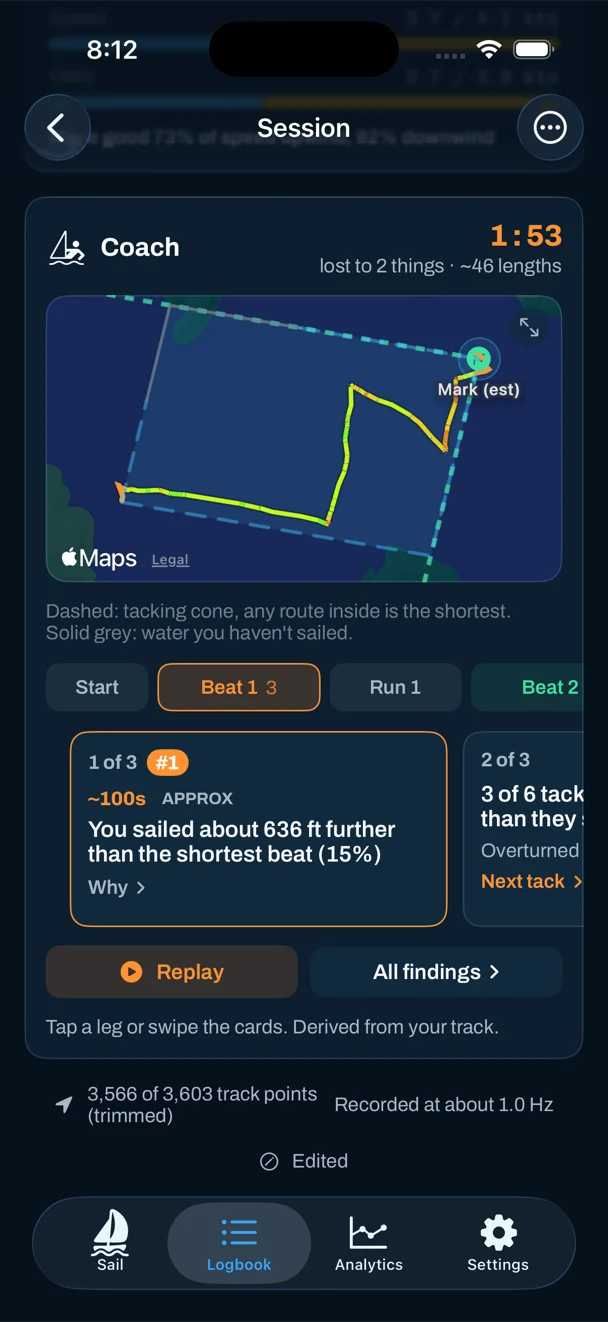
What a fitness watch can't tell us
Importing from other devices is in beta, and we'd rather you knew its limits up front:
- No gun. A watch's activity doesn't know when the race started, so every number covers the whole recording until you trim it. Vakaros files are the exception.
- No start line. Distance from the line at the gun and the favoured end need the line ends, which only a Vakaros file or a race recorded in Sail Tactician carries.
- No course over ground, and sometimes no speed. Most watches don't record them, and some record the odd impossible speed spike. Both are worked out from your positions, and a speed stream that disagrees with the track is set aside.
- No heel or trim. Those need a mounted iPhone.
We've tested the importer against real files from Garmin, COROS, Suunto and Strava, including some deliberately damaged ones, but few of those were sailing races. Every imported race carries a BETA note with a Report a problem button. If a number looks wrong, tell us which watch made the file — that's how this comes out of beta.
Want the start too?
The bit an import can't give you
Importing gets you the debrief. What it can't add is what happened before the gun: the countdown, the line pings, distance to the line and time to burn, and the start analysis that judges your start against that line. For that, race with Sail Tactician on an Apple Watch or a mounted iPhone — see the best sailing watches if you're weighing that up. Or keep your Garmin on your wrist and the phone in the cockpit, and get both.
Questions
Do I need Sail Tactician Pro to import races?
No. Importing and exporting work on the free tier.
Can I import races from an Android phone or a Garmin directly?
The file needs to reach an iPhone, since Sail Tactician runs on iPhone and Apple Watch. Export it from Garmin Connect, Strava or your watch's app, then AirDrop, email or save it to iCloud Drive and open it on the iPhone.
Will my heart rate come across?
Yes, from any format that carries it, which includes FIT files from Garmin, COROS, Suunto and Polar.
Can I import a whole season at once?
Yes. Select several files in the import picker, or import a .zip of them. Duplicates are skipped.
Can I compare my imported race with a friend's?
Yes, if your friend records with Sail Tactician and shares the race with you. Open your imported race and choose Compare; it needs the two races to overlap in time by at least two minutes.
Sources
Export steps from the makers' help centres: Suunto FAQ "What type of files can I export", Polar "Export training sessions from Flow", Strava "Exporting your data", COROS support, Google Health "Export your activity", Velocitek VTK converter, Vakaros "Telemetry logging", Sailmon "How to download my data"; Garmin steps via TrainingPeaks help; HealthFit and RunGap App Store listings (accessed 6 Oct 2026). Sail Tactician behaviour from the in-app User Guide, version 3.2.
What changed
- First published. Prices and specifications checked against makers' and retailers' sites.
Put a racing instrument on your wrist.
Start line, wind shifts and VMG at a glance, and a coach in your pocket afterwards. Free to download for Apple Watch and iPhone, with the full debrief on your first five races.
Download on the App Store