
The short version
- What it is
- A picture of your sailing, made in two taps: your track on a map, the wind, and the numbers you choose. Free on every plan.
- Where
- Open a session, then ⋯ → Share Image. For a season or a year, the share button at the top of Analytics.
- What it won't do
- Point at your dock, show the time of day, or claim something the session didn't earn.
Make a card
- Open any session in the Logbook.
- Tap ⋯, then Share Image.
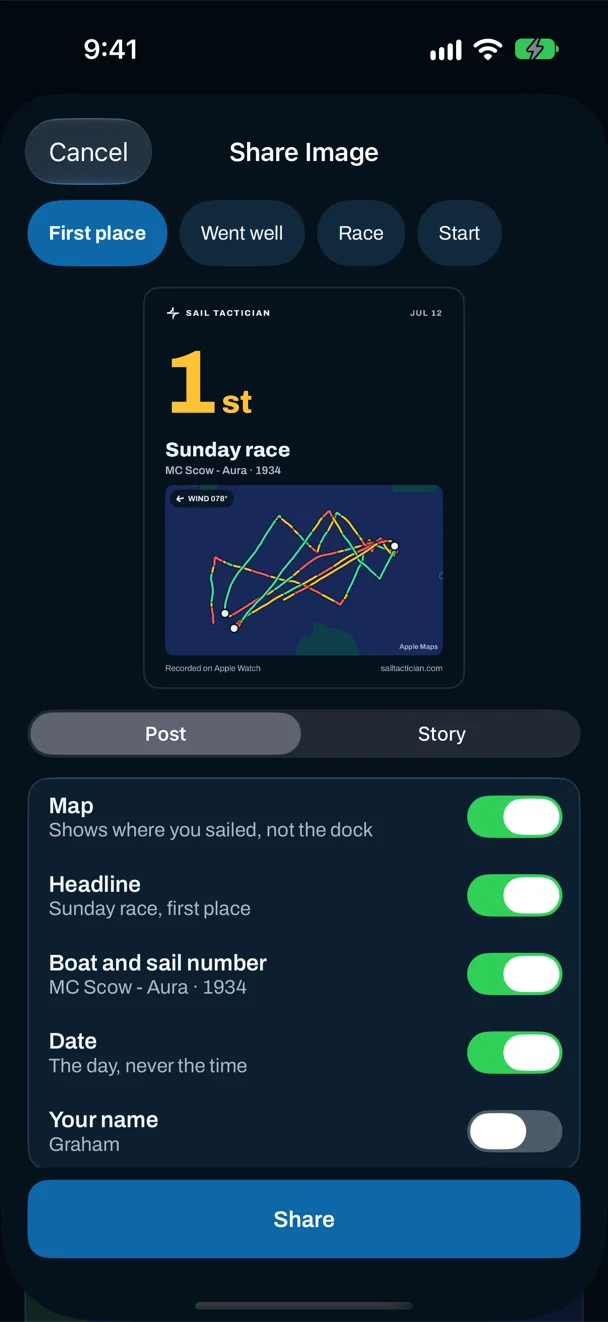
- Pick a card from the row at the top, and Post (4:5, for a feed) or Story (9:16).
- Tap Share. It goes to the usual iOS share sheet: Messages, Instagram, your club's group chat, or Save Image.
The preview on screen is the image that gets posted, not a second drawing of it. What you see is what your friends see.
Which cards you'll be offered
The sheet leads with the card you're most likely to be proud of, and only offers one when the session earned it.
| Card | You get it when |
|---|---|
| First place | You entered a first under Results & Notes for a race. |
| Personal best | It's your fastest top speed on that boat, with at least three earlier sessions to beat. |
| Went well | The Coach card found something you did well: a start on time and at speed, clean tacks, a tidy beat. |
| Race, Training or Day sail | Always, when there's a track or a number to show. |
| Start | The race has a start line and you crossed it cleanly. |
There is no card for a bad day. A decline is never offered as a card, and a number the session didn't measure is never listed.
Choose what it shows
- Numbers. On a race, training or day-sail card, tap a number to swap it for anything that session measured: time, distance, top or average speed, upwind or downwind VMG, tacks, gybes, tack recovery. Choose None on the third for two larger numbers.
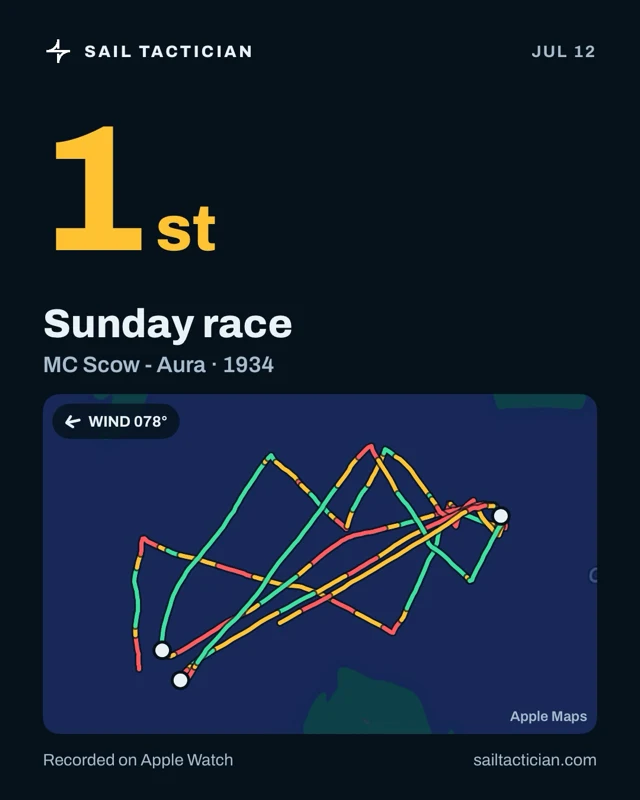
- Map. On by default. Your track is drawn on a map with your course marks, colored by speed.
- Wind. An arrow for the wind appears when you set the wind yourself, when it comes from a windward mark you placed, or from a forecast (labelled FORECAST). A wind the app could only guess from your track is never drawn: a wrong arrow is worse in public than no arrow.
- Headline, boat and sail number, date, your name. Each has its own switch.
Your choices are remembered for next time.
What a card never shows
A sailing track is also a map to where you keep your boat, so the card is careful by default.
- Never the dock. The last 300 m (about 1,000 ft) of every track is left off. With no starting gun, such as a day sail, the first 300 m is left off too.
- The day, never the time.
- Your name is off until you turn it on, and then it's your first name only.
- The map does show where you sailed. Lake and road names can appear on it. Turn Map off and the card draws your track alone, with no place on it.
A race keeps its start, because the start line is part of the story. If you began the countdown somewhere you'd rather not show, turn the map off for that card.
A season, a year, a milestone
- Analytics has a share button at the top. It makes a card of whatever your filter shows (a month, a boat, a season), one for your latest year, and one for the best of that year.
- If your tack or gybe recovery, or your speed loss, really improved over at least six sessions on one boat, it offers an Improvement card first.
- Every earned milestone at the bottom of Analytics (first race, ten races, 100 nautical miles and so on) has its own Share button.
Questions
Is sharing an image free?
Yes. Share images are free on every plan. Comparing races boat on boat with another sailor is a Pro feature; a picture of your own sailing is not.
Will the card show where I keep my boat?
No. The last 300 m of every track is left off, and the first 300 m too when there's no starting gun. Turn the map off and no place is shown at all.
Why is there no wind arrow on my card?
The arrow is only drawn from a wind you set, a windward mark you placed, or a forecast. If the app could only estimate the wind from your track, it leaves the arrow off, because that estimate can point the wrong way.
What size are the images?
Post is 1080 × 1350 pixels (4:5) and Story is 1080 × 1920 (9:16).
Can I share a whole season?
Yes. The share button at the top of Analytics makes a card from whatever your filter shows, plus your latest year and the best of that year.
Sources
Sail Tactician behavior from the in-app User Guide, version 3.4.
What changed
- First published.
Put a racing instrument on your wrist.
Start line, wind shifts and VMG at a glance, and a coach in your pocket afterwards. Free to download for Apple Watch and iPhone, with the full debrief on your first five races.
Download on the App Store