
The short version
- Who it's for
- Day sailors, cruisers and anyone who wants a record of their time on the water — and owners of older boats, dinghies and daysailers with few or no instruments.
- What you get
- Speed, heading, distance and time at the helm on your iPhone or Apple Watch; heel and trim on a mounted phone; and every sail recorded in your Logbook, with its track, a season tally and trends.
- What you need
- An iPhone, optionally an Apple Watch, and for a helm display a waterproof case and a bracket. Nothing wired into the boat.
- What it costs
- The cruise screens are free. Your first five sessions include the full analysis; Pro keeps every sail after that.
Most sailing apps assume you're either racing or navigating. A lot of sailing is neither: an evening on the lake, a breezy Saturday in the bay, a gentle afternoon teaching a friend to helm. Cruise is the mode we built for that. It drops everything a race needs — the countdown, the start line, the tactics — and keeps what's useful on any sail: a clear instrument display, an honest record of where you went and how fast, and a picture of your season.
Why log a sail that isn't a race
Because memory is a poor logbook. A recorded sail answers the questions you'll ask later: how far did we go, how fast was she in that gust, how long were we out, which day this summer was the best breeze? Over a season the record turns into something more useful — whether you're getting quicker, how your boat performs on each point of sail, how many hours you've really spent on the water.
And if you also race, the cruises are where you learn the boat. Every sail adds to the same history the race analysis draws on.
An instrument panel for a boat without one
Plenty of good boats carry no electronics at all: an older keelboat with a bulkhead compass and a tell-tale, a dinghy, a classic daysailer. Fitting a speed and heading display usually means a transducer, a masthead unit, cabling and a weekend with a drill. A phone in a bracket does a useful share of it in five minutes.
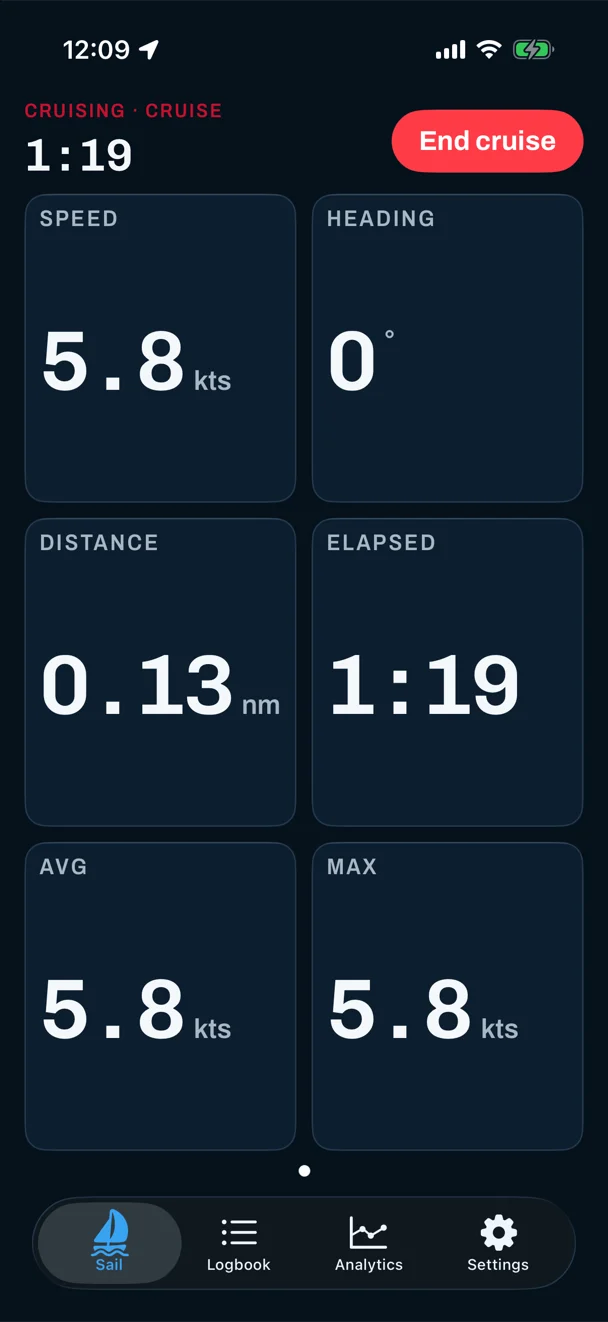
- A Cruise view opens automatically when you start a cruise — speed, heading, distance, elapsed time, and average and top speed — laid out to read from the helm. You don't configure anything.
- Make it yours. Build your own screens from the same readouts, from one huge number to eight at once. A number's size is set by the width it gets, so a stacked layout reads from further away.
- Mount the iPhone and add heel and trim. Level it once at the dock and it reads both, live, in degrees — the clinometer most small boats never had. The screen stays on while the app is open, so it's there when you glance at it.
- On the wrist. The Apple Watch shows its own cruise pages — speed, heading, distance, average and top speed, heart rate, wind and calories by default — so the helm can glance down without leaving the tiller.
A mounted phone also notices capsizes and knockdowns from its motion sensors and marks them on the session. It's a record, not an alarm — it doesn't call anyone.
What a phone can and can't replace
It's worth being exact about this, because a phone is not a full instrument system.
| Instrument | Covered? | With Cruise mode |
|---|---|---|
| Speedo / log | Yes | Speed and distance over the ground from GPS. A paddlewheel measures speed through the water; in a current the two differ. |
| Compass | Yes | Heading from the phone or watch compass, and course over the ground from GPS. Keep the boat's own compass for steering by. |
| Clinometer | Yes | Heel and trim, on a mounted, levelled iPhone. |
| Trip log / logbook | Yes | Every sail recorded with its track, distance, time, and average and top speed. |
| Wind instrument | Partly | A forecast of wind speed, gusts and direction for the area — not a live masthead reading. |
| Depth sounder | No | — |
| Chartplotter | No | No charts, routes or anchor alarm. Use a navigation app or plotter for those. |
| VHF, AIS | No | — |
So: a phone makes a good speed, heading and heel display and an excellent logbook. It doesn't replace the gear that keeps you off the rocks, and you shouldn't navigate by it.
The day at a glance
Where a race shows its countdown, a cruise shows the day before you set off:
- Sunset and the daylight left, worked out on the device itself — so it's there with no signal, which on most lakes and coasts is exactly when you want it.
- The forecast — wind speed, gusts, temperature and conditions. A cellular Apple Watch fetches its own; with no connection it simply says so.
- Ready to record — whether GPS has a fix and the battery is up to it. On the watch, a slow GPS lock or a low battery turns the top line amber and tells you, without taking any room from the Start button.
- Your season so far on the phone — how many sails, how far, and your longest.
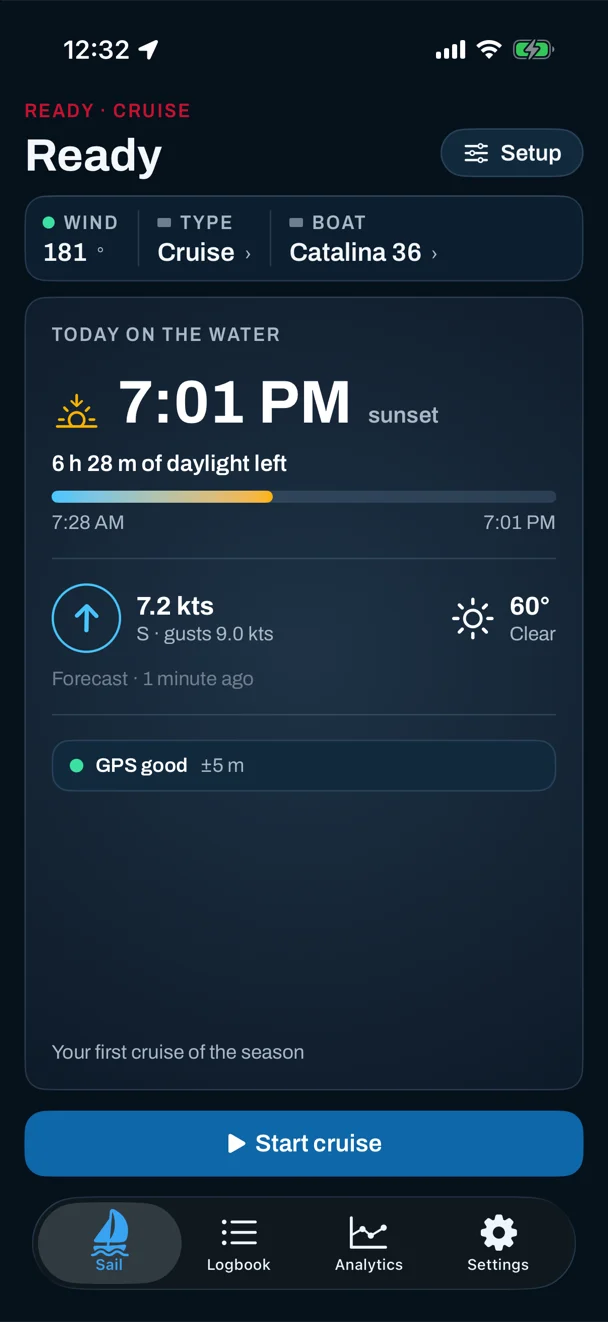
Then one tap on Start records straight away. No countdown, no gun, no line to set.
Every sail in your Logbook
Every cruise lands in the Logbook alongside any races and training, filed as a cruise so you can filter for it. Rename it, add notes, change the boat. It syncs to your iPad and any new phone through your own iCloud — there's no account to make, and nothing goes to a server of ours.
Long days are fine. The track is saved every 30 seconds for the first hour, then every minute, then every two minutes after three hours, so an all-day sail doesn't spend its battery re-saving an ever-growing track. GPS itself never backs off — the track is the point. At most the last couple of minutes are at risk if something goes wrong, and ending the sail always saves everything.
After the sail
Open a cruise and you get the same session view a race does, minus the race-only parts:
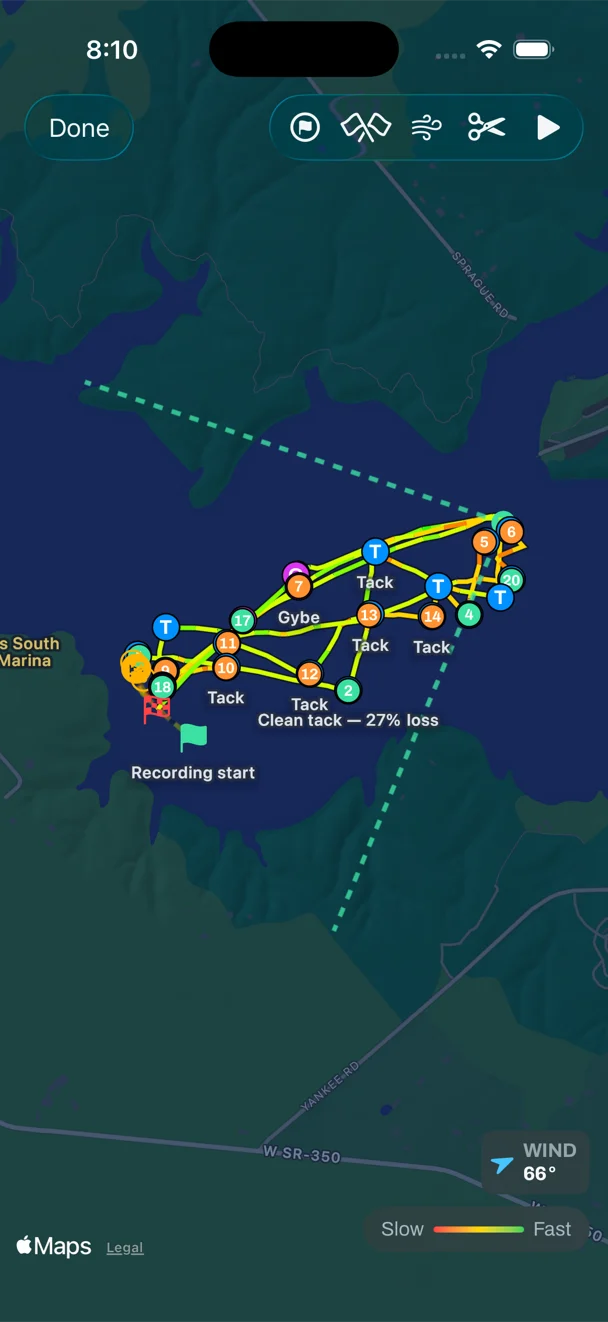
- The track on a map, coloured by speed, with every tack and gybe marked.
- A speed chart over the whole sail, and heel if the phone was mounted.
- With a wind set — you can add one afterwards on the map — the polar of how fast you went at each angle, port vs starboard, and upwind vs downwind.
- Replay the sail at up to eight times speed.
Across the season, Analytics shows time on the water, average and top speed and their trends, filtered to cruises if you like. There's no Coach card on a cruise — with no course and no result there's nothing to grade, and we'd rather not invent a lesson.
Setting it up
- Install Sail Tactician on your iPhone (and Apple Watch, if you have one).
- Choose your boat from the 55 class presets, or add your own — it's what the polar is measured against.
- Set Cruise as the default session type in Settings, so every session starts as one.
- For a helm display: put the iPhone in a waterproof case on a bracket, screen up and top toward the bow, turn on Phone Mounted and level it once at the dock.
- Check the day, tap Start, go sailing. Tap End when you're back.
And if you race
The same app on race day
Switch the session type to Race and the countdown, start line, wind-shift tracking and post-race Coach come back, on the same watch and phone. Your cruises and races sit in one Logbook, and the boat you learned on a Sunday is the one you race on a Wednesday. See what Sail Tactician does differently.
Questions
Do I need any instruments on the boat?
No. Cruise mode uses only the GPS, compass and motion sensors in your iPhone and Apple Watch. Nothing is wired into the boat.
Is the speed the same as my boat's log?
Not quite. The app shows speed over the ground from GPS; a paddlewheel log measures speed through the water. With no current they match closely. In a tide or current they differ, and for passage planning the speed over the ground is usually the one you want.
Is Cruise mode free?
Yes. The cruise screens and live readouts are free. Each recorded cruise counts toward your first five sessions with the full analysis, like a race; after that, Pro keeps your whole history open.
Can I use it with just an Apple Watch?
Yes. The watch records a cruise on its own and shows its own cruise pages, and the session syncs to your iPhone afterwards.
Will it drain my phone's battery on a long day?
GPS and a bright screen use power, so on a long sail plug a mounted phone into a USB supply if you can. The app saves the track less often as the day goes on so recording itself stays light, and the watch eases off its compass during a cruise.
Can I navigate with it?
No. It has no charts, depth or routing. Use it alongside your compass, charts and a navigation app, not instead of them.
Sources
Everything here describes Sail Tactician 3.2 and is taken from the in-app User Guide (Settings → Support → User Guide): Default Session Type, Device Mounting, Metric Views, Session Detail, Analytics and the Apple Watch chapter.
What changed
- First published. Prices and specifications checked against makers' and retailers' sites.
Put a racing instrument on your wrist.
Start line, wind shifts and VMG at a glance, and a coach in your pocket afterwards. Free to download for Apple Watch and iPhone, with the full debrief on your first five races.
Download on the App Store